
Every month I choose a Big Word to ponder. This month the word is TIME. If you have ever looked at a clock and realized you’ve run out of time, then you know how important it is to manage your writing time.
The Metadata Story Sheet
Metadata is a set of data that describes other data. There are many kind of metadata sheets that can be real timesavers. For example, a while back, I discussed making and using a marketing cheat sheet.
Another time-saving metadata sheet that fiction writers should consider having is a Story Sheet to be used during the writing process. Like a Story Bible, it is a place to collect important elements related to your story. But unlike the bulky story bible, which has every fact and detail in it, a Story Sheet is a place to record the overall story components, which you may have created in many different documents or formats, and gather them together in one easy-to-search document.
Story Sheet Components
While each writer will have their own data points to collect, the basic elements will be the same for most. You can add, subtract, and order these items in any way that makes sense to you. Here are some possible components.
- Genre
- Subgenre
- Planned length
- Chapter length
- Comparables – Similar Books/Authors
- Potential Readers
- Title ideas
- Subtitle ideas
- Theme or point of story
- Setting(s)
- Protagonist
- Antagonist(s)
- Mentors
- Sidekicks/Friends
- Conflict
- Stakes
- Important events/plot points
- Timeline of Events
- Opening event
- Ending event
- Log Lines
- Summaries/Pitches
Putting the Story Sheet Together
Building a Story Sheet is a flexible and personal process. As you can see for the example items above, list things that relate to the basic development of your story. During writing, you can add and change what you record on the sheet. Therefore the sheet needs to be quick and easy to use.
The easiest way to do this is to create a single word processor document and list the items you want to track. Put a space between each item. Now go back and make each item a HEADING using the heading function. To see the headings open FIND and click on the Headings tab in the FIND window on the left. (These directions are for WORD, but all word processors can do this).
Here is what it looks like:
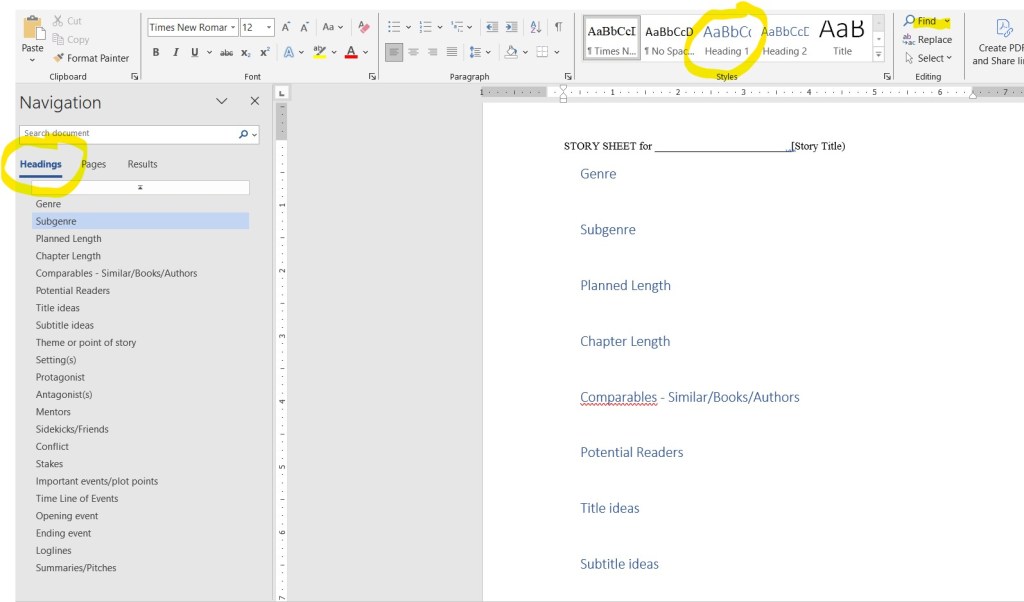
Now when you want to enter information under a heading, click the topic in the heading list on the left. and instantly you will be at the right spot.
*NOTE: If you want to avoid the use of headings or are not able to use them, consider listing the items alphabetically as way to make new entries quicker to do.
Benefits of a Story Sheet
It doesn’t take long to make the blank story sheet. Once you have one, you can:
- Know exactly what data to collect
- Quickly find and add or change information
- See what information you still need
- Quickly review the basic elements of your story as you write
- Develop the materials that you can later use in marketing your book, i.e. a logline, summary, pitch and more.
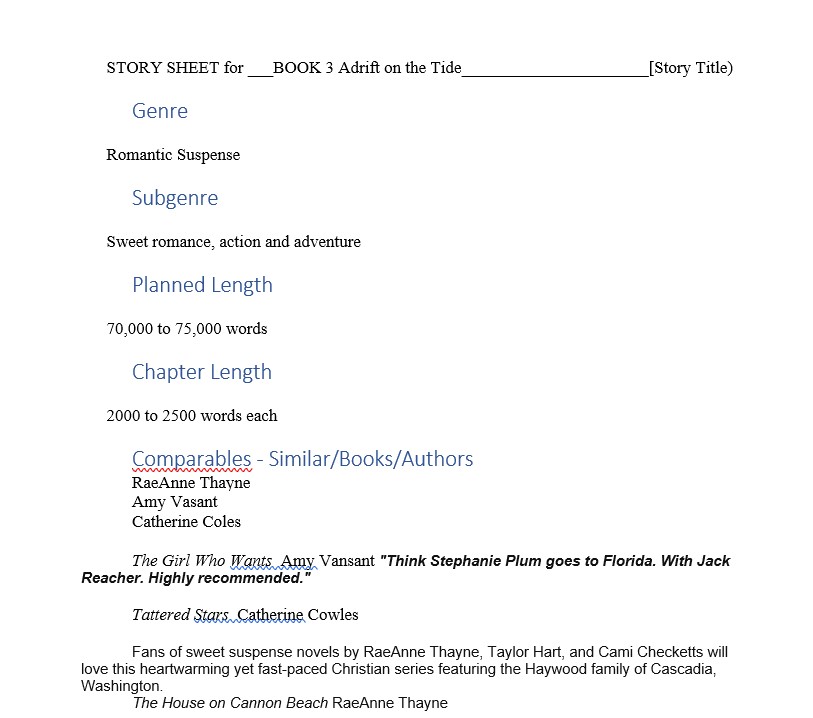
Here is an example page from my upcoming Tide Harbor Book 3.
Get Started
Sometimes the simplest process can be the most efficient way to do something. A Story Sheet is little more than a word document, but it can truly be a timesaver when you are writing. Give it a try!
I’d love to hear from you. Do you think creating a Story Sheet will help you save time? Do you have a different method? Drop a comment below.
Discover more from ZARA WEST'S JOURNAL
Subscribe to get the latest posts sent to your email.
